


The 22 best 3d mouse brands
3Dconnexion, Logitech and HP lead our ranking of 22 3d mouse brands. Compare what each brand makes, visit its official site, or shop it online.
3D Mouse brands, ranked
TSCentral is reader-supported: we may earn a commission when you shop through links on this page. It does not affect the ranking.
-
1
3Dconnexion
Six-axis controllers for CAD and 3D modelling, from compact desktop pucks to full-size professional consoles.
Top products: SpaceNavigator· SpaceMouse Pro· SpacePilot Pro
Website: 3dconnexion.com |Brands like 3Dconnexion
Popularity 10.0/10
-
2

Logitech
Older puck-style controllers from a company better recognised for everyday mice and keyboards.
Top products: Navigator· 3D Mouse 871003
Website: logitech.com |Brands like Logitech
Popularity 3.5/10
-
3

HP
The Hewlett-Packard Company was founded when completely electronic computers did not exist. It was 1939, and the only printers were industrial-sized. Its defining feature was its health care plan for its employees and its use of an open office floor plan, allowing for convenient operations. Its manufacture of high-end products allowed it to rapidly gain a presence worldwide, making it one of the most famous technology brands today.
Website: hp.com |Brands like HP
Popularity 3.5/10
-
4

ELECOM
Three-button wired and wireless mice aimed at CAD users, a cheaper alternative to dedicated space controllers.
Top products: M-CAD01DBBK
Popularity 2.9/10
-
5

Razer
Razer builds gaming mice, keyboards and computers aimed at players, with ergonomic and optical mice such as the DeathAdder and Viper models. Its gaming peripherals come with customizable drivers and RGB lighting. The lineup spans mice, keyboards and full systems, all designed around competitive play.
Website: razer.com |Brands like Razer
Popularity 2.2/10
-
6

Dell
Michael Dell founded PC’s Limited in 1984 with the intent of providing customized upgrades for computers. The initiative was successful, and Dell dropped out of college to start building computers. Soon, he started selling his designs, which were met with tremendous success. Over time, he could offer computers of premium quality at economical prices. In 1988, the company was renamed Dell Computer Corporation and continued to provide modern products.
Website: dell.com |Brands like Dell
Popularity 2.2/10
-
7

Microsoft
The year 1975 saw two boys convert a famous computer programming language for personal use. They went on to start a company and moved on to develop other programming languages. This company produced essential operating systems for the International Business Corporation’s first personal computer. In 1995, Windows 95 was released, which could keep up with the Apple OS. Today, we know the company as Microsoft.
Website: microsoft.com |Brands like Microsoft
Popularity 2.0/10
-
8

A4TECH
A4TECH was founded in 1987. It is a technology company that manufactures cutting-edge products for consumers. They have a lot of patents and got the rights over their original and exclusive products. They are very keen on making quality goods incorporated with modern technologies. They have recently expanded their manufacturing power and opened a gaming brand called Bloody. A4TECH continues to research and develop its accessories. You can find all kinds of desktop accessories in their inventory.
Website: a4tech.com |Brands like A4TECH
Popularity 1.6/10
-
9

Lenovo
A presenter-style mouse with 3D touch control, aimed at ThinkPad users rather than CAD work.
Top products: ThinkPad X1 Presenter Mouse
Website: lenovo.com |Brands like Lenovo
Popularity 1.6/10
-
10

ROCCAT
ROCCAT's gaming company focuses on creating superior-quality goods that improve the gaming experience. They are dedicated to producing gaming equipment that provides players a competitive advantage in the rapidly changing world of online multiplayer games. Finding great-quality solutions that meet...
Website: roccat.com |Brands like ROCCAT
Popularity 1.4/10
-
11

Redragon
Redragon builds mechanical keyboards, gaming mice and mouse pads for players on a budget. Its range also covers headphones, gamepads and mouse mats. Its gear has sturdy construction and bright, stylish designs aimed at everyday gaming setups, from mechanical keyboards...
Website: redragonzone.com |Brands like Redragon
Popularity 1.2/10
-
12

Kensington
Kensington produces laptop security locks, along with docking stations, wireless mice, trackball mice and wrist rests. The company is known as a manufacturer of computer accessories for office and home use. Its products include ergonomic designs that support comfortable desk...
Website: kensington.com |Brands like Kensington
Popularity 1.2/10
-
13

Compaq
Owners repairing or upgrading older desktop and portable computers look for replacement hard disks, power supplies, AC adapters and keyboards. Compaq is a computer brand founded in 1982 in Houston, Texas, and it later became part of Hewlett-Packard. Its founder...
Website: compaq.com |Brands like Compaq
Popularity 1.2/10
-
14

Fujitsu
IT is a field of knowledge that is growing at an extreme rate. All the ideas and concepts within the stream are proving to be useful for the development. Fujitsu Global is one of the leading IT services providers across...
Website: global.fujitsu |Brands like Fujitsu
Popularity 1.2/10
-
15

ASUS
ASUS makes gaming-focused motherboards, RAM modules and USB components, along with AC adapters for laptops. The Taiwanese electronics company, founded in 1989, is recognized for its Republic of Gamers line. Its products cover PCs, peripherals and smart home devices.
Website: asus.com |Brands like ASUS
Popularity 1.2/10
-
16
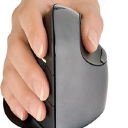
Evoluent
Evoluent makes computer mice, and its vertical mouse holds the hand in a handshake position to ease wrist and forearm strain. Its wireless models come in standard, vertical and small sizes, with versions designed for Mac users. The vertical design...
Website: evoluent.com |Brands like Evoluent
Popularity 0.8/10
-
17

Genius
Genius is a digital media firm based in the United States. Users may add comments and interpretations to music lyrics, news articles, sources, poetry, and documents on the site. Genius is a place where musicians, creatives, and superfans can talk...
Popularity 0.8/10
-
18

IBM
In this era of technological advancements, there are essential services that can not be substituted with anything else. The requirement for computers in every sector of work is increasing on a daily basis. That is why IBM is a crucial...
Website: ibm.com |Brands like IBM
Popularity 0.8/10
-
19

Acer
Acer started in 1976 in Taiwan and now sells computers, monitors and storage products in more than 160 countries. The company's range includes 8GB memory modules, SATA hard disks and hard drives, and general computer parts for upgrades and repairs.
Popularity 0.8/10
-
20

AOPEN
AOPEN produces computer components and electronics, including power supplies, RAM modules and CD drives. The Taiwanese company, founded in 1996 and part of Acer, also builds digital signage players, panel PCs and embedded systems for healthcare and education.
Popularity 0.8/10
-
21

AULA
Gamers assemble! This is what AULA's products would do when the gaming enthusiasts get to know about the features and functions provided by the products. Inspired by the traits of a tarantula, the company offers a fast, sturdy and ruthless...
Website: aulagaming.com |Brands like AULA
Popularity 0.8/10
-
22

Finalmouse
Gaming is now one of the trendiest things nowadays. But getting all gaming-related accessories can be a bit difficult. An essential gaming accessory is a mouse but it isn't easy to find. That's why FinalMouse came up with some fantastic...
Website: finalmouse.com |Brands like Finalmouse
Popularity 0.8/10
Official websites and social accounts
| Brand | Website | X / Twitter | YouTube | ||
|---|---|---|---|---|---|
| 3Dconnexion | 3dconnexion.com | /3Dconnexion | – | @3Dconnexion | – |
| Logitech | logitech.com | /Logitech | logitech | @Logitech | – |
| HP | hp.com | – | – | – | – |
| Razer | razer.com | /razer | razer | @Razer | – |
| Dell | dell.com | – | – | – | – |
| Microsoft | microsoft.com | /MicrosoftIndia | – | @microsoftindia | IndiaMicrosoftVideos |
| A4TECH | a4tech.com | – | – | – | – |
| Lenovo | lenovo.com | /LenovoIndia | lenovo_india | @lenovo_in | LenovoVision |
| ROCCAT | roccat.com | /ROCCAT | ROCCAT | @ROCCAT | roccatstudios |
3D Mouse Buying Guide
For professionals and enthusiasts alike, a 3D mouse can be a game changer when it comes to productivity, efficiency, and comfort while working on 3D design projects. A 3D mouse enables you to control and navigate your designs in a more natural and intuitive way, allowing you to focus on the creative process rather than the technical aspects of the software. In this buying guide, we will cover the key factors to consider when choosing the right 3D mouse for your needs.
Ergonomics and Comfort
When working on long design projects, ergonomic design and comfort are essential. You don't want to end up with wrist pain or other physical discomfort after long moments of working on your design projects. Therefore, it's important to consider the ergonomics of a 3D mouse before buying it. Look for a design that is comfortable and easy to use without straining your wrist. A 3D mouse should be lightweight with enough contouring to allow you to use it for hours with ease.
Compatibility with Software
Most professional 3D design software already has compatibility with 3D mice. Each manufacturer will specify on their website which software the devices are compatible with. Compatibility can usually be determined from the software's support page, so knowing which software you use will narrow down which 3D mouse options are available.
Keep in mind that not all software applications work with all 3D mice. Certain devices are not supported by some software or have limited support. In this case, you may want to check with the manufacturer before purchasing.
Wireless vs. Wired
Whether to choose a wired or wireless 3D mouse is a personal preference that depends on the user's habits and preferences. Wired 3D mice are generally more reliable and have lower latency than wireless mice. They're also easier to set up as they will only need to be plugged in rather than going through a syncing process. They do have the drawback of being tethered to your computer, which means less mobility.
Wireless 3D mice are more versatile and offer more flexibility in terms of movement, allowing you to work from a distance or without being constrained by cords. However, they can be susceptible to radio interference which can cause issues with latency and reliability. With wireless 3D mice, you need to make sure that batteries are kept charged and the device is synced with the computer.
Number of Buttons
The number of buttons on a 3D mouse can determine how much customization and control you have over your workflow. More buttons can offer more convenience, especially for power users who can customize them to fit their specific needs. However, a higher number of buttons can also be daunting for new users who may find it difficult to learn how to utilize them effectively.
If you're just starting with 3D design, a 3D mouse with fewer buttons may be a good option. But if you're an experienced professional, it's worth investing in more buttons for full customization of your workflow.
DPI
Dots per inch (DPI) is a measure of how sensitive a 3D mouse is to movement. A higher DPI means that the mouse is more responsive to even the smallest movements, making it easier to work with precise designs. A lower DPI can be useful when working on larger designs that require less precision.
Most 3D mice come with adjustable DPI, allowing users to choose the sensitivity of the device. This means that you can adjust the DPI to your personal preferences and specific design needs. Consider choosing a 3D mouse that offers adjustable DPI for even more control over your design work.
Price
3D mice are specialized tools that often come at a premium price. Depending on the manufacturer and the features, the price can vary widely. It is essential to determine the budget, and then you can choose a mouse that is within that range, and it maximizes your requirements in terms of features and design.
However, if you're a professional, the investment in a 3D mouse can pay off in the long run by saving you time and increasing productivity. So, consider the cost as a long-term investment in your work.
Conclusion
A 3D mouse can be a game-changer for creative professionals working on 3D design projects. The key factors to keep in mind while choosing a 3D mouse are ergonomics, compatibility with your software, wired or wireless options, the number of buttons, DPI, and price. When comparing different options, make sure to consider all these factors to pick the best 3D mouse for your individual needs and preferences.


