The 30 best keyboard with touchpad brands
Logitech, Adesso and Rii lead our ranking of 30 keyboard with touchpad brands. Compare what each brand makes, visit its official site, or shop it online.
Keyboard With Touchpad brands, ranked
TSCentral is reader-supported: we may earn a commission when you shop through links on this page. It does not affect the ranking.
-
1
Logitech
Logitech's wireless models suit living-room PCs and smart TVs, with built-in trackpads and a Bluetooth option for sofa use.
Top products: K400 Plus· K830· TK820
Website: logitech.com |Brands like Logitech
Popularity 10.0/10
-
2

Adesso
Adesso's compact wired and wireless boards with touchpads target affordable desks, with multi-OS compatibility on the EasyTouch 445.
Top products: EasyTouch 445· WKB-4050UB· AKB-410US
Website: adesso.com |Brands like Adesso
Popularity 5.3/10
-
3

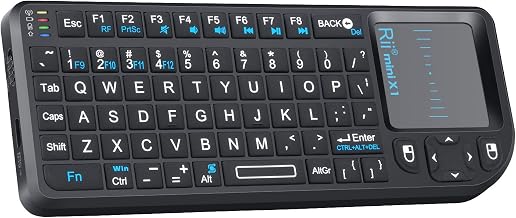
Rii
Rii's small multimedia boards pair with phones, tablets and PCs, and the K18S folds into a pocket-sized couch remote.
Website: riitek.com |Brands like Rii
Popularity 4.7/10
-
4

Apple
Stephen Wozniak had a dream of building his computer. In 1976, Wozniak partnered with his former high-school classmate, Steve Jobs, and began operations at Jobs’ family garage. Their first model was a lone working circuit board, which they worked into a customized plastic canister. Years later, Wozniak invented the disk controller, which made information storage and retrieval more convenient. This enabled Apple to become the first choice for amateur programmers. The rest is history.
Website: apple.com |Brands like Apple
Popularity 4.6/10
-
5

Microsoft
Microsoft's Surface-matched covers and compact keyboards give a laptop-style input with a glass touchpad on tablets.
Top products: Surface Go Type Cover· Wireless Compact Keyboard
Website: microsoft.com |Brands like Microsoft
Popularity 4.6/10
-
6

Corsair
Design and upgrade your gaming rig with Corsair! They promise high-performance gear and equipment, and you will find everything you need for professional gaming and content creation. The company website allows you to customize your own PC in simple steps along with recommendations and compatibility checks. Corsair takes pride in its compelling influence over the e-sports domain. PC components and software enhance your gaming efficiency and give your set-up a high-toned look. Shop now!
Website: corsair.com |Brands like Corsair
Popularity 4.4/10
-
7

HP
Built into HP laptops, the touchpad row sits beneath the keys, while its separate wireless board suits desk setups.
Website: hp.com |Brands like HP
Popularity 4.3/10
-
8

Dell
Dell's K20M is a folio-style case with a touchpad, aimed at owners of its tablets rather than desktop typists.
Top products: K20M
Website: dell.com |Brands like Dell
Popularity 4.2/10
-
9

Lenovo
Laptop-integrated touchpads on ThinkPad models are the main draw, with compact wireless boards for desk setups.
Website: lenovo.com |Brands like Lenovo
Popularity 4.0/10
-
10

Acer
Acer's keyboards with touchpads sit mainly on its laptops, plus compact wireless sets for Windows and Chromebook setups.
Popularity 3.4/10
-
11

Samsung
Samsung's Smart TV keyboards add a touchpad for browsing, and the wireless models also pair with Windows PCs.
Top products: VG-KBD2000· VG-KBD1000
Website: samsung.com |Brands like Samsung
Popularity 3.3/10
-
12

Cherry Electrical
Most of us know that the conventional energy sources we have been using for years are experiencing a shortage, and in not so long, they will deplete completely. Therefore, it is more important to have companies like Cherry Electrical in...
Website: cherry.de |Brands like Cherry Electrical
Popularity 3.3/10
-
13

ASUS
ZenBook and VivoBook laptops carry the built-in touchpads, while separate wireless boards handle desktop typing.
Website: asus.com |Brands like ASUS
Popularity 3.2/10
-
14

iKey
iKey builds rugged keyboards with touchpads for industrial and field use, including mountable and skinny mobile models.
Top products: SL-86-911-TP-USB· SkinnyBoard SB-87-TP-M
Website: ikey.com |Brands like iKey
Popularity 3.2/10
-
15

iPazzPort
iPazzPort's mini wireless boards bundle a touchpad with a 2.4G dongle, aimed at TV and media-box setups.
Top products: Bluetooth Mini Keyboard with Touchpad
Website: ipazzport.com |Brands like iPazzPort
Popularity 2.3/10
-
16

Razer
Razer builds gaming mice, keyboards and computers aimed at players, with ergonomic and optical mice such as the DeathAdder and Viper models. Its gaming peripherals come with customizable drivers and RGB lighting. The lineup spans mice, keyboards and full systems,...
Website: razer.com |Brands like Razer
Popularity 2.2/10
-
17

Fosmon
Fosmon is your one-stop-shop for anything you need to update, modify, and customize your electronic devices. Thousands of items are available, including audio/video connections, gaming headsets, mobile accessories, smartphone cases, etc. Fosmon provides quick shipping and affordable rates on all...
Website: fosmon.com |Brands like Fosmon
Popularity 2.1/10
-
18

TG3
User interfaces are getting friendlier by the day, and TG-3 Electronics shares credit for that. Their erudite sense of sophistication brings some of the best input technologies of the day into the market. Be it medicine or government, in under...
Website: tg3electronics.com |Brands like TG3
Popularity 2.1/10
-
19

iclever
iClever makes computer keyboards, including Bluetooth models, and headphones, including kids headphones. Its children's headphones are over-ear designs with a built-in volume limiter that cuts sound when levels get too high. The brand offers multicoloured styles in bright patterns.
Website: iclever.com |Brands like iclever
Popularity 2.1/10
-
20

Perixx
Perixx builds computer keyboards, wireless mice and ergonomic keyboards for office and home desks. Its keyboards and mice are designed for comfortable typing and long daily use. Combined wireless keyboard and mouse sets are also available.
Website: perixx.com |Brands like Perixx
Popularity 1.9/10
-
21

Rapoo
A Chinese maker of computer accessories, Rapoo sells wireless mice, silent mice, Bluetooth mice and computer keyboards. The company also offers headphones, webcams and wireless chargers. Its products are built with an emphasis on stylish designs and sturdy materials.
Website: rapoo-eu.com |Brands like Rapoo
Popularity 1.9/10
-
22

Targus
With society progressing rapidly, the one desire that has remained the same is the need to connect. Targus is here to provide you with the latest technology to allow you to fulfill your dreams. For over 35 years, the brand...
Website: us.targus.com |Brands like Targus
Popularity 1.8/10
-
23

Seal Shield
You can type with the waterproof and machine-washable Sealshield keyboard with the utmost comfort. It offers the best defense against spills, bacteria, dust, and debris. With its very tiny form, you may text in any setting comfortably and with full...
Website: sealshield.com |Brands like Seal Shield
Popularity 1.6/10
-
24

Anker
Anker is the world’s leading mobile charging brand, evidently embracing future technology. The company’s hyper flash powerhouses that are portable and can charge almost any device within minutes can completely charge themselves in around an hour. With continuous modernization and...
Website: anker.com |Brands like Anker
Popularity 1.6/10
-
25
Riitek
Founded in 2010 in Shenzhen, China, Riitek makes compact wireless keyboards, mini keyboards and Bluetooth remote controls. Its mini wireless keyboard and mouse sets are used with TVs, media boxes and computers. The range centres on small, portable input devices...
Website: riitek.com |Brands like Riitek
Popularity 1.6/10
-
26

Brydge
Brydge keyboards connect wirelessly to your tablet, allowing you to use it as a laptop. The keypad is constructed of aircraft-grade metal and has a precise mechanical hinge that holds your screen in place while typing. Its accessories are created...
Website: brydge.com |Brands like Brydge
Popularity 1.5/10
-
27

Havis
Havis has been delivering ergonomic goods as a mobile workforce for more than 80 years. Provides mission-critical equipment with exceptional safety and quality. Customers are provided with correct information on how to meet their requests for mobile computing in automobiles...
Website: havis.com |Brands like Havis
Popularity 1.4/10
-
28

Kano
Kano builds modular, hands-on computers designed to be assembled and explored, and its lineup centers on DIY PC kits. Its products appeal to beginners learning how computers work as well as home users wanting a simple setup. Accessories and peripherals...
Website: kano.me |Brands like Kano
Popularity 1.3/10
-
29

Kensington
Kensington produces laptop security locks, along with docking stations, wireless mice, trackball mice and wrist rests. The company is known as a manufacturer of computer accessories for office and home use. Its products include ergonomic designs that support comfortable desk...
Website: kensington.com |Brands like Kensington
Popularity 1.3/10
-
30

Panasonic
Matsushita Konosuke founded the Matsushita Electric Industrial Company to produce electric plugs and lamp sockets that he had designed. The 30s incorporated these products and experienced a rapid expansion of business. Over the years, various products such as irons, radios,...
Website: panasonic.com |Brands like Panasonic
Popularity 1.3/10
Official websites and social accounts
| Brand | Website | X / Twitter | YouTube | ||
|---|---|---|---|---|---|
| Logitech | logitech.com | /Logitech | logitech | @Logitech | – |
| Adesso | adesso.com | /AdessoInc | – | @marketingadesso | UCU49AD2l9pxYVAAWgXdW_g |
| Rii | riitek.com | – | – | – | – |
| Apple | apple.com | – | – | @AppleSupport | – |
| Microsoft | microsoft.com | /MicrosoftIndia | – | @microsoftindia | IndiaMicrosoftVideos |
| Corsair | corsair.com | /Corsair | corsairgaming | @Corsair | CorsairMemoryInc |
| HP | hp.com | – | – | – | – |
| Dell | dell.com | – | – | – | – |
| Lenovo | lenovo.com | /LenovoIndia | lenovo_india | @lenovo_in | LenovoVision |
Keyboard With Touchpad Buying Guide
For those who want a compact and versatile input device for their computer or home theater system, a keyboard with touchpad can be a great option. Instead of using a separate mouse to navigate your computer or media player, you can use the touchpad on the keyboard itself.
However, with so many options available in the market, choosing the right keyboard with touchpad can be a daunting task. In this article, we will guide you through some important considerations to help you choose the right keyboard with touchpad for your needs.
Wireless vs Wired
The first decision you need to make when choosing a keyboard with touchpad is whether you want a wired or a wireless one. Wired keyboards with touchpad connect to your computer via a USB cable, and are usually cheaper, but less flexible when it comes to placement.
On the other hand, wireless keyboards with touchpad use Bluetooth or a USB dongle to connect to your computer, allowing you to use them from a distance or move them around easily. However, they are usually more expensive than wired keyboards, and may require batteries or charging.
Size and Layout
The size and layout of your keyboard with touchpad can have a significant impact on your typing speed and accuracy. If you plan to use it for long hours or for typing-intensive tasks, you may want to consider a full-sized keyboard with a standard layout, as it can be more comfortable and familiar to use.
On the other hand, if you want a more compact keyboard to save desk space or to use with a media center, you may prefer a mini or compact keyboard with a smaller footprint. However, be aware that some compact keyboards may have a non-standard layout and smaller keys, which can take some time to get used to.
Touchpad Features
The touchpad on your keyboard with touchpad can have different features and functionalities, depending on the model and brand. Here are some important touchpad features to consider:
- Size: The size of the touchpad can affect how comfortable and precise it is to use. Look for a touchpad that is large enough to allow for smooth cursor movement and gestures, without being too small or too large for your hand.
- Sensitivity: The sensitivity of the touchpad can determine how responsive it is to your touch. A touchpad with adjustable sensitivity settings can allow you to customize it to your liking.
- Gestures: Some touchpads support multi-touch gestures, such as scrolling, zooming, and swiping, which can be useful for navigating your computer or media player more efficiently.
- Buttons: Most touchpads come with dedicated left and right buttons, but some also have a middle button or a clickable surface, which can provide additional functionality.
- Noise: Some touchpads can make clicking or tapping noises when used, which can be distracting or annoying to some users. Look for a touchpad that is quiet and responsive.
- Accuracy: The accuracy of the touchpad can determine how well it tracks your movements and responds to your inputs. Look for a touchpad that is precise and consistent, with little to no lag or jitters.
Compatibility
When choosing a keyboard with touchpad, make sure it is compatible with your computer or media center system. Some keyboards may only work with certain operating systems, such as Windows or Mac, while others may have limited functionality on some platforms.
Also, consider the connection type of your keyboard with touchpad. If you plan to use it with a smart TV, for example, make sure it supports HDMI or USB connectivity.
Brands and Price
There are many brands that offer keyboards with touchpad, ranging from well-known names like Logitech and Microsoft to lesser-known ones like UtechSmart and Rii. Each brand has its own features, designs, and price points, so it's important to do some research and compare them before making a purchase.
Generally, the prices of keyboards with touchpad can vary widely, depending on the brand, features, and quality. While it's tempting to go for the cheapest option, keep in mind that you may sacrifice some quality and longevity for a lower price. On the other hand, some high-end keyboards with touchpad may offer more advanced features and durability, but may not be necessary for your needs.
Conclusion
A keyboard with touchpad can be a convenient and versatile input device for your computer or media center. By considering factors such as wireless vs wired, size and layout, touchpad features, compatibility, brands, and price, you can choose the right keyboard with touchpad that meets your needs and budget.