
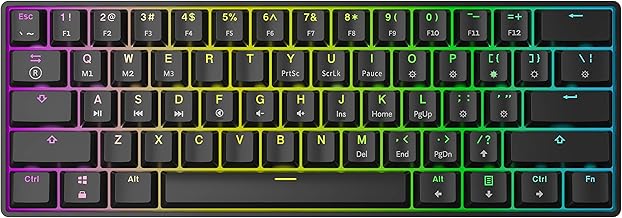

The 27 best 60 keyboard brands
Razer, Corsair and Ducky lead our ranking of 27 60 keyboard brands. Compare what each brand makes, visit its official site, or shop it online.
60 Keyboard brands, ranked
TSCentral is reader-supported: we may earn a commission when you shop through links on this page. It does not affect the ranking.
-
1
Razer
Optical switches and analog key sensing on the newer Huntsman Mini boards suit fast-action gaming.
Top products: Huntsman Mini· Huntsman V3 Pro Mini· Huntsman Quartz Edition
Website: razer.com |Brands like Razer
Popularity 10.0/10
-
2

Corsair
Hall effect and Cherry MX switch options cover both rapid-trigger gaming and classic mechanical feel.
Top products: Clipper Pro Mini 60· K65 RGB Mini· K60 RGB Pro
Website: corsair.com |Brands like Corsair
Popularity 8.6/10
-
3

Ducky
Hot-swap sockets and PBT keycaps on the One 3 Mini let you change switches without soldering.
Top products: One 2 Mini· One 3 Mini
Website: duckychannel.com.tw |Brands like Ducky
Popularity 5.3/10
-
4

HyperX
Compact 60 percent frames with linear or red switch options suit players who want a small desk footprint.
Top products: Alloy Origins 60· Alloy Origins 65
Website: hyperxgaming.com |Brands like HyperX
Popularity 5.0/10
-
5

Royal Kludge
Budget-friendly wired and wireless 60 percent boards with RGB lighting and knob options for desk setups.
Website: en.rkgaming.com |Brands like Royal Kludge
Popularity 4.8/10
-
6

HP
The Hewlett-Packard Company was founded when completely electronic computers did not exist. It was 1939, and the only printers were industrial-sized. Its defining feature was its health care plan for its employees and its use of an open office floor plan, allowing for convenient operations. Its manufacture of high-end products allowed it to rapidly gain a presence worldwide, making it one of the most famous technology brands today.
Website: hp.com |Brands like HP
Popularity 4.2/10
-
7

AULA
Magnetic Hall-effect switches with rapid trigger make the WIN60 HE Pro a tuned competitive option.
Top products: WIN60 HE Pro· Mini 60· WIN60 HE
Website: aulagaming.com |Brands like AULA
Popularity 4.0/10
-
8

Redragon
Lower-priced hot-swap boards with a rapid-trigger model suit players wanting trigger speed.
Top products: K630 Dragonborn· MCK617 Fizz· K617 HE
Website: redragonzone.com |Brands like Redragon
Popularity 3.5/10
-
9

Logitech
Lightspeed wireless link and GX tactile switches on a compact 60 percent frame suit mixed desk use.
Top products: G PRO X 60 LIGHTSPEED
Website: logitech.com |Brands like Logitech
Popularity 3.5/10
-
10

SteelSeries
Adjustable actuation and an RGB 60 percent frame make the Apex Pro Mini a precise competitive choice.
Top products: Apex Pro Mini
Website: steelseries.com |Brands like SteelSeries
Popularity 3.5/10
-
11

KBDFANS
KBDFANS produces mechanical keyboards in compact layouts, along with switches and keycaps. Its designs are unusual, and it offers neon keycap colors. The brand also sells fully assembled keyboards as well.
Website: kbdfans.com |Brands like KBDFANS
Popularity 3.2/10
-
12

Acer
Acer started in 1976 in Taiwan and now sells computers, monitors and storage products in more than 160 countries. The company's range includes 8GB memory modules, SATA hard disks and hard drives, and general computer parts for upgrades and repairs.
Popularity 2.5/10
-
13

Pfu
Happy Hacking layouts strip out arrows and function keys, leaving a minimal 60 percent typing board.
Website: ricoh.com |Brands like Pfu
Popularity 2.3/10
-
14

Cherry Electrical
Switch maker whose MX stems power a large share of mechanical boards, including many 60 percent models.
Website: cherry.de |Brands like Cherry Electrical
Popularity 2.2/10
-
15

Dell
Michael Dell founded PC’s Limited in 1984 with the intent of providing customized upgrades for computers. The initiative was successful, and Dell dropped out of college to start building computers. Soon, he started selling his designs, which were met with...
Website: dell.com |Brands like Dell
Popularity 1.6/10
-
16
Kinesis
Kinesis designs bicycles, frames, forks and components, with a range that includes road, cyclocross and adventure models built for UK riding conditions. Kinesis frames are sold in several countries, and the company's factory is based in Taiwan.
Popularity 1.5/10
-
17
Cooler Master
Cooler Master started out as a Taiwanese maker of computer hardware aimed at people building their own PCs. The brand's core products are CPU coolers, computer cases, power supplies and case fans. Its products are sold through online stores and...
Website: coolermaster.com |Brands like Cooler Master
Popularity 1.3/10
-
18

Toshiba
Toshiba makes hard disk drives, SATA hard drives, RAM modules and other computer parts. Its products cover storage and electronics for both personal computers and business systems.
Website: toshiba.com |Brands like Toshiba
Popularity 1.2/10
-
19

IBM
In this era of technological advancements, there are essential services that can not be substituted with anything else. The requirement for computers in every sector of work is increasing on a daily basis. That is why IBM is a crucial...
Website: ibm.com |Brands like IBM
Popularity 1.2/10
-
20

Rii
The small portable keyboard-mouse combinations are made and sold by Rii. The company's products work with all widely used platforms, including Android phones, Apple iPhones, Windows PCs, smartphones, tablets, and other Bluetooth devices. You may select the customization choices that...
Website: riitek.com |Brands like Rii
Popularity 1.2/10
-
21

Motospeed
Mechanical keyboards, keyboard switches, and gaming keyboards are central to Motospeed's computer peripheral range. The brand also makes gaming mice and headsets, sold at moderate prices. The keyboards and switches cover both mechanical and gaming models, while the mice and...
Website: motospeed.cc |Brands like Motospeed
Popularity 1.1/10
-
22

Microsoft
The year 1975 saw two boys convert a famous computer programming language for personal use. They went on to start a company and moved on to develop other programming languages. This company produced essential operating systems for the International Business...
Website: microsoft.com |Brands like Microsoft
Popularity 1.0/10
-
23

Lenovo
From China, Lenovo sells laptops, desktop computers, tablets and monitors, along with PC parts such as AC adapters and USB 3.0 accessories. The company traces its roots to 1984, when it was founded as Legend Holdings. It later took over...
Website: lenovo.com |Brands like Lenovo
Popularity 1.0/10
-
24

ASUS
ASUS makes gaming-focused motherboards, RAM modules and USB components, along with AC adapters for laptops. The Taiwanese electronics company, founded in 1989, is recognized for its Republic of Gamers line. Its products cover PCs, peripherals and smart home devices.
Website: asus.com |Brands like ASUS
Popularity 1.0/10
-
25

iclever
iClever makes computer keyboards, including Bluetooth models, and headphones, including kids headphones. Its children's headphones are over-ear designs with a built-in volume limiter that cuts sound when levels get too high. The brand offers multicoloured styles in bright patterns.
Website: iclever.com |Brands like iclever
Popularity 0.9/10
-
26

Adesso
Adesso's keyboards, wireless mice and desk accessories are built for comfort during long hours at a computer. The range also includes floor lamps and modern lamps. The designs aim for practicality at moderate prices across both computer accessories and lighting.
Website: adesso.com |Brands like Adesso
Popularity 0.8/10
-
27

iKey
iKey began making rugged keyboards and computer peripherals for professionals and technical users working in demanding conditions. Its compact keyboards and keyboards with touchpads are built to hold up in harsh environments.
Website: ikey.com |Brands like iKey
Popularity 0.8/10
Official websites and social accounts
| Brand | Website | X / Twitter | YouTube | ||
|---|---|---|---|---|---|
| Razer | razer.com | /razer | razer | @Razer | – |
| Corsair | corsair.com | /Corsair | corsairgaming | @Corsair | CorsairMemoryInc |
| Ducky | duckychannel.com.tw | /duckychannel | duckychannel | @duckychannel | Ducky Keyboard |
| HyperX | hyperxgaming.com | /hyperxcommunity | hyperx | @hyperx | – |
| Royal Kludge | en.rkgaming.com | – | – | – | – |
| HP | hp.com | – | – | – | – |
| AULA | aulagaming.com | – | – | – | – |
| Redragon | redragonzone.com | /redragonusa | – | @redragonusa | Redragon Official |
| Logitech | logitech.com | /Logitech | logitech | @Logitech | – |
| SteelSeries | steelseries.com | /SteelSeries | steelseries | @steelseries | SteelSeries |


